Project structure in Forma
On 13 October 2026 the Snowdon Towers trial showed a Data Management project with ten modules in the left navigation and five type folders under Project Files. This page records that structure. One folder was opened.
- Project
- Snowdon
- Product
- Forma
- Folders
- 5
- Opened
- 1
The five folders group files by type. They sit directly under Project Files. They are a practice filing structure. They are separate from the ISO 19650 states Work in Progress, Shared, Published, and Archived, and the screen showed no parent folder named Digital Engineering Practice.
The project shell
The header read Autodesk Forma, with Data Management selected, and the project name Construction: Sample Project – Snowdon Towers. A trial banner read “Welcome to your 30 day trial – Forma Data Management.” The account mark in the corner was NL.
Files opened on a welcome panel: “Welcome to Files. Keep your project data centralized, accessible, and secure with permission controls.” That sentence is the product’s own introduction. This session did not open a permissions screen, so member groups and folder access stay unrecorded.
Modules
The left navigation is the project’s module list. Files was the working area. Reviews was opened only as far as approval-workflow settings, which were empty. The other modules were visible and left closed.
| Module | What the screen showed |
|---|---|
| Files | Opened. Folders view, with Project Files expanded. |
| Specifications | Listed. Left closed. |
| Reviews | Settings opened. Approval workflow and Draft approval workflow tabs. The list read “No workflows.” |
| Transmittals | Listed. Left closed. Create transmittal was also on the file menu and was left unused. |
| Issues | Listed. Left closed. |
| Boards | Listed. Left closed. |
| Reports | Listed in Forma. Left closed. This is the product’s Reports module, separate from the 04_Reports folder. |
| Members | Listed. Left closed. |
| Bridge | Listed. Left closed. |
| Settings | Listed. Left closed. |
Files
Inside Files, two tabs sit at the top of the folder pane: Folders and Packages. Folders was selected. Packages was left closed. A Deleted Items link sat at the top right of the same pane and was left closed.
The structure on the screen reads like this. Project Files is the only folder root, and the five type folders sit directly under it.
- Construction: Sample Project – Snowdon Towers
- Data Management
- Files
- Folders
- Project Files
- 01_Design Files
- 02_Drawings
- 03_Models
- 04_Reports
- 05_Contracts
- Project Files
- Packages
- Folders
- Specifications
- Reviews
- Transmittals
- Issues
- Boards
- Reports
- Members
- Bridge
- Settings
- Files
- Data Management
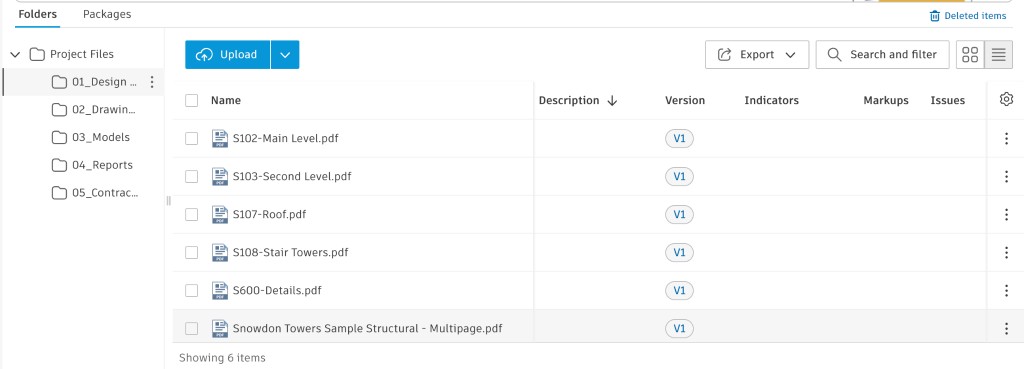
A folder view uses six columns: Name, Description, Version, Indicators, Markups, and Issues. The toolbar offers Upload, Open with continuous scroll, Export, and Search and filter.
The five folders
Each folder name matches the practice filing plan: drawings as PDF, drawings as DWG, the model, the issue workbook, and the contract. The local counts below are from Report 03’s reading of the source folder. Forma confirmed names and versions only where this table says the folder was opened.
| Folder | Practice role | Local inventory | Forma on 13 Oct |
|---|---|---|---|
| 01_Design Files | PDF drawings | 6 PDFs | Opened. Six names, each at V1. Descriptions, markups, and issues empty. |
| 02_Drawings | DWG sheets | 5 DWG files | Folder name visible. File list left closed. |
| 03_Models | Revit model | 1 RVT file | Folder list left closed. The downloaded file and one later 3D screen are in Report 05. |
| 04_Reports | Issue workbook | 1 XLSX file | Folder name visible. File list left closed. |
| 05_Contracts | Subcontract | 1 DOCX file | Folder name visible. File list left closed. |
01_Design Files, as listed
| File | Version |
|---|---|
| S102-Main Level.pdf | V1 |
| S103-Second Level.pdf | V1 |
| S107-Roof.pdf | V1 |
| S108-Stair Towers.pdf | V1 |
| S600-Details.pdf | V1 |
| Snowdon Towers Sample Structural - Multipage.pdf | V1 |
The folder count read “Showing 6 items.” S102 is the file inspected in Report 04: one page, version history of V1, and a review form that stayed unsent. The sheet number S102, S103, S107, S108, and S600 is the structural series. The sixth file is the multipage set of that same sample.
Reviews beside the folders
Approval workflow lives under Reviews, in Settings, rather than inside a folder. Two tabs were present: Approval workflow and Draft approval workflow. The page read “No workflows,” and the create dialog offered templates from one step through five steps. None was created. Submit for review on S102 therefore had an empty workflow list. The file can sit in 01_Design Files at V1 while the project still has no review path.
Still unread in this structure
- Forma file lists inside 02_Drawings, 03_Models, 04_Reports, and 05_Contracts. The downloaded copies of those folders are read in Report 03. The structural RVT is read further in Report 05.
- The Packages tab and Deleted Items.
- Specifications, Transmittals, Issues, Boards, the Reports module, Members, Bridge, and project Settings.
- Attribute values on the files. The file menu offered them; the attribute screen stayed closed.
On the Forma screen, one folder of six PDFs was confirmed. Report 03 reads the downloaded copies of all five folders and all fourteen files.